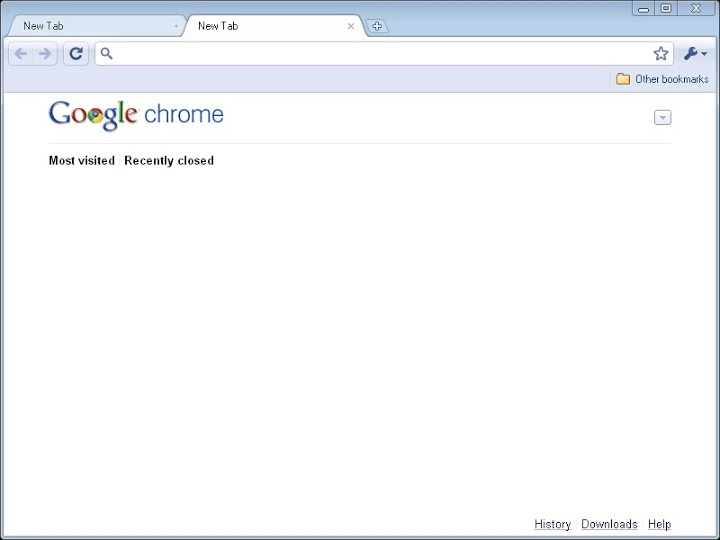

Chrome Vista Theme: Nostalgic Browser Look
Overview
The software allows users to customize the appearance of Google Chrome to resemble the Vista Basic theme from Windows Vista. Designed specifically for desktop users on Windows, it offers a retro aesthetic that replicates the visual style of an older operating system. This tool is ideal for individuals seeking to personalize their browsing experience with a vintage touch, particularly those who appreciate the design language of early 2000s computing environments.
While the developer has not provided additional background, the application serves as a niche utility focused on visual customization rather than functional enhancement. It is best suited for hobbyists, retro computing enthusiasts, or users who enjoy unique desktop themes. Real-world usage includes personalizing workstations, creating themed setups, or simply revisiting familiar UI elements from a previous era of computing.
The software does not alter browser functionality—its sole purpose is aesthetic transformation.
Key Features & Capabilities
- Vista Basic Theme Integration – Applies the authentic visual style of Windows Vista’s default theme to Google Chrome’s interface, including window borders, buttons, and color schemes.
- Browser Aesthetic Customization – Enables users to change the look of Chrome without modifying core browser behavior or performance.
- Lightweight Design – With a file size of 2.1 MB, the application is compact and quick to install, minimizing system impact.
- Windows-Specific Compatibility – Tailored for use on Windows operating systems, ensuring seamless integration with the native UI framework.
- Non-Invasive Implementation – Does not require administrative privileges or deep system modifications, preserving browser stability.
Users can apply the theme during installation or through a simple configuration menu. This feature is particularly useful for creating consistent desktop environments across multiple devices or for users who prefer a uniform visual language across their software ecosystem. The tool is designed for ease of use, making it accessible even to those with limited technical experience.
User Interface, Workflow & Performance
The user interface is minimal and straightforward, aligning with the software’s lightweight nature. Navigation is limited to a basic setup wizard and a configuration panel, both of which are easy to understand and operate. The workflow is linear: download, install, apply theme, and restart Chrome.
No complex settings or advanced options are present, which streamlines the experience for casual users. The application does not introduce noticeable delays during startup or operation. Performance observations are based on general software behavior patterns, as specific resource usage details were not provided.
The developer did not specify CPU or RAM behavior, but the small file size suggests low overhead. Stability appears consistent with similar utilities, though real-world testing data is not available. No known conflicts with Chrome’s core functions have been reported.
Compatibility & System Requirements
The software is designed for use on Windows operating systems and is compatible with Windows versions released around or after 2007. The application has a file size of 2.1 MB and requires standard installation procedures. Exact system requirements were not listed, so users should ensure their system meets the baseline needs for running Google Chrome.
The developer did not provide additional details about hardware specifications, such as processor speed or memory. Compatibility information is limited to the operating system, with no mention of support for Windows 10, 11, or other modern platforms. Users should verify that their Chrome version supports theme extensions or modifications, as compatibility may vary across browser updates.
Pros and Cons
Pros
- Delivers an authentic Vista Basic theme aesthetic for Chrome
- Small file size and fast installation
- Non-invasive and safe to use
- Perfect for retro enthusiasts and customization lovers
- Free to download and use
Cons
- No official support for modern Windows versions beyond basic compatibility
- Limited to visual changes—no functional improvements
- No update history or version changelog provided
- Developer background not disclosed
- May not work with newer Chrome updates due to API changes
FAQ Section
Is this software compatible with Windows 10 and 11?
Compatibility with Windows 10 and 11 is not officially confirmed. The software was released in 2007 and may not support newer operating system versions due to changes in system architecture and browser APIs.
Is the software safe to use?
The software is free and does not require administrative access. It applies visual themes only and does not install additional components or modify core system files. However, users should exercise caution when downloading from third-party sources.
Does the software require an internet connection?
No, the software does not require an internet connection after installation. The theme is applied locally within the Chrome browser.
Can I uninstall the theme later?
Yes, users can remove the theme by reverting to the default Chrome appearance through the browser settings. The software does not leave behind persistent system changes.
Is this software free to download?
Yes, the software is available at no cost. No licensing fees or subscription models are associated with its use.
Final Thoughts + CTA
This software offers a unique, nostalgic experience for users who value visual consistency and retro aesthetics. While it serves a very specific purpose—transforming Chrome’s appearance to match Windows Vista’s default theme—it does so effectively and without complications. Its lightweight footprint and straightforward workflow make it ideal for casual users and enthusiasts alike.
The lack of modern support and updates is a notable limitation, but for those seeking a throwback interface, it remains a viable option. If you’re looking to personalize your browser with a vintage touch, this tool delivers on its promise. Download Vista Chrome Theme now.







